


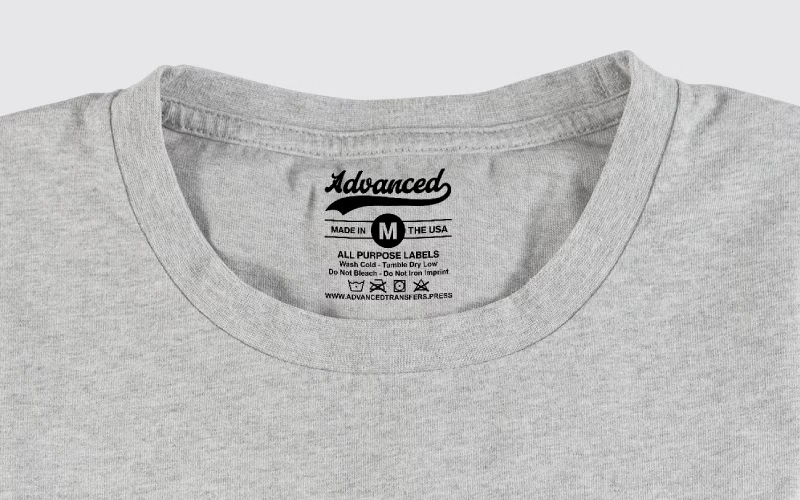
If you want your clothing brand to feel like something customers would buy off a retail rack, you cannot stop at just the front print. Custom neck label transfers are one of the smallest details that instantly make your garments look finished, consistent, and premium.
Instead of scratchy sewn tags, you use tagless neck labels that are heat pressed directly inside the shirt. Your logo, size, care instructions, and brand details all show in a clean, professional way.
In this guide, we will walk through what neck label transfers are, what to include in them, how they help in branding your clothing line, and how to apply them correctly.
What Are Custom Neck Label Transfers?
Custom neck label transfers are small heat transfers designed specifically for the inside back neck area of a garment. They usually contain:
- Your brand name or logo
- Size (S, M, L, XL, etc.)
- Fabric content
- Care instructions
- Country of origin or RN number if you use one
Instead of sewing in a physical tag, you press these transfers directly onto the inside neck so the label becomes part of the shirt.
You can get them printed on:
- Plastisol transfers
- DTF transfers
- Other tagless-safe formulas that hold up to washing
Most serious brands like the plastisol option because the print is sharp, durable, and has that retail look.
Why Neck Label Transfers Matter for Branding Your Clothing Line
A customer might not know exactly why your shirt feels more professional, but they notice details.
Here is how custom neck label transfers help your brand:
1. They make your brand feel real
When someone flips the shirt and sees your logo, clean sizing, and clear care instructions, it feels like a brand they can trust, not a one-off print.
It shows:
- You care about presentation
- You thought about the entire product, not just the front art
2. Tagless neck labels are more comfortable
Nobody likes a scratchy tag on the back of their neck. With tagless neck labels, there is no extra fabric to itch or fold.
That means fewer complaints, fewer people cutting tags out, and a better overall experience when they wear your clothes.
3. Easy rebranding of blank garments
If you buy blanks from major suppliers, they often have generic manufacturer tags. By removing or hiding those and adding your own neck label transfers, you control the brand message.
All your garments, even if they are different blank brands, now look unified under your label.
4. They help with size control and organization
Clean, bold neck labels make it easier for you (and any staff) to quickly sort and pull sizes when you are packing orders or working events.
What Information Should Go On Custom Neck Label Transfers?
You do not want to cram too much tiny text into a small space, but there are some basics that most brands include.
1. Brand name or logo
This is your main flex. Keep the logo simple and readable. This is not the place for a crazy detailed illustration.
You can use:
- A clean wordmark
- A simplified version of your main logo
- A small icon plus your name
2. Size
Make the size very clear. Often this is the largest text element after the logo.
Common formats:
- S, M, L, XL, 2XL
- Or numeric sizing for certain garments
Place it where your eye goes immediately when you flip the shirt inside out.
3. Fabric content and care
Most brands include basic details like:
- 100% Cotton
- 60% Cotton / 40% Polyester
And simple care instructions such as:
- Machine wash cold
- Tumble dry low
- Do not iron decoration
Keep the text short and clear, not a full paragraph.
4. Country of origin or RN
If you want to keep everything consistent, you can add:
- “Made in [Country]”
- Or an RN number if your business uses one
This helps with compliance and also gives your brand a more professional, established feel.
Design Tips for Tagless Neck Labels That Actually Look Good
Designing tiny prints is different from designing a big front graphic. Here are some simple rules.
Keep fonts clean and legible
Use a simple sans-serif font or a clean serif. Avoid very thin lines or ultra-light weights.
Test your design at actual size:
- Print it on regular paper at the real dimensions
- Hold it at arm’s length
- If you struggle to read it, your customers will too
Use high contrast
Since most neck areas are black, white, or another solid color, choose an ink color that stands out:
- White on black, navy, dark heather
- Black or dark grey on white or light colors
Avoid low contrast combinations like dark grey on black.
Do not go crazy with details
Tiny icons, big paragraphs, and decorative borders can clutter the label and make it unprintable at small scale.
Focus on:
- Logo
- Size
- Short care line
- Fiber and origin line
That is enough to feel complete.
Sizing and Layout for Neck Label Transfers
Every brand is different, but here are some common size ranges for tagless neck labels:
- 2.0 to 2.5 inches wide
- 1.0 to 1.5 inches tall
You can lay them out on gang sheets to save money. For example:
- Multiple rows of S, M, L, XL, 2XL
- Different color ways or logo versions
- Men’s and women’s cuts on the same sheet
When you order custom neck label transfers, tell your supplier:
- The exact finished size you want
- How many sizes you need per sheet
- Whether you want them laid out in order (S through 2XL)
How to Apply Neck Label Transfers With a Heat Press
The process is similar to pressing a normal front design, just in a smaller area.
1. Prep the garment
- Turn the shirt inside out, so the neck area is facing up on the platen
- Smooth out any wrinkles
- Remove any original tag if needed and allowed
2. Quick pre-press
Do a short pre-press, usually 3 to 5 seconds, to remove moisture and flatten the fabric.
3. Position the neck label transfer
Place the transfer in the center of the neck area, slightly below the collar seam so it sits in a natural spot.
You can:
- Eyeball it once you have practice
- Or use a simple ruler or neck guide at first
4. Press with the recommended settings
Every transfer type comes with specific instructions for:
- Time
- Temperature
- Pressure
- Peel type (hot, warm, or cold)
Follow those exactly. Because neck labels are small, they tend to press quickly and cleanly if your settings are right.
5. Peel and check
Peel the carrier sheet (according to hot or cold peel directions) and check:
- No missing letters
- No edges lifting
- Print is clear and smooth
If needed, you can do a very quick second press with a cover sheet to finish the surface.
When to Add Neck Label Transfers to Your Line
You can use custom neck label transfers on almost any garment, but they are especially good for:
- T-shirts that you are already selling well
- Premium “brand” pieces in your collection
- Limited drops you want to feel exclusive
- Hoodies and crewnecks where you remove the original tag
A smart approach is:
- Identify your core best-selling blanks and designs.
- Order neck labels sized and laid out for those specific garments.
- Start adding tagless neck labels to every new batch you press.
Over time, your entire line will feel more unified and retail ready.
Ordering Smart: Getting the Most Out of Custom Neck Label Transfers
To make your neck labels more cost effective:
- Use one ink color for all labels if possible, such as white or light grey.
- Order a quantity that matches how many shirts you realistically expect to sell, so labels are always fresh and current.
If you already order front and back designs, talk to your transfer supplier about combining tagless neck labels on the same sheet whenever it makes sense.
Final Thoughts: Small Detail, Big Upgrade
Neck labels are a small print, but they say a lot about your brand.
By using custom neck label transfers and clean tagless neck labels, you:
- Make your garments more comfortable
- Make your brand look more established and retail ready
- Keep sizing and branding consistent across your entire line
If you are serious about branding your clothing line, neck labels are one of the easiest upgrades you can make. Start with your best-selling items, design a simple and clear neck label, and press them with every batch. After you see the difference in how your products look and feel, it will be hard to go back to plain blank tags.